
How to Withdraw and Deposit Money in Your Account?
Description
How to Withdraw and Deposit Money in Your X555 Game Account?
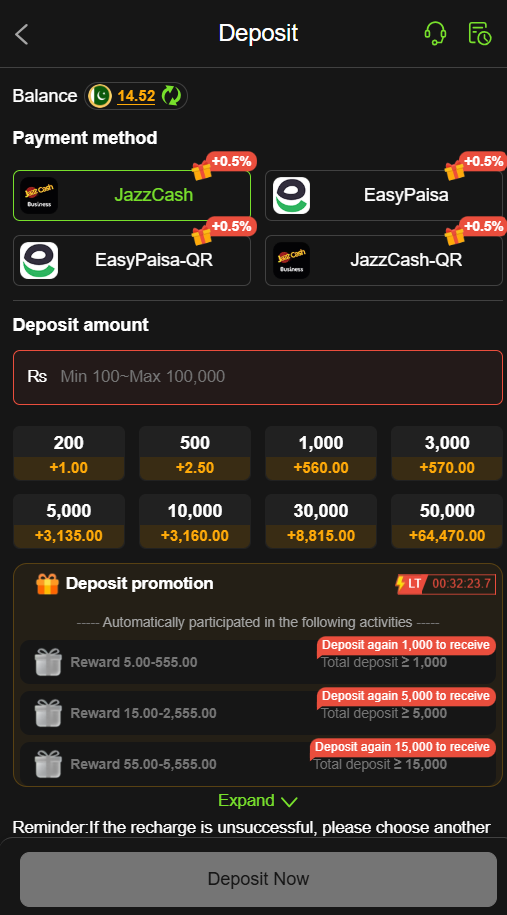
Managing your balance is an important part of using the X555 Game. Whether you want to add money before playing or withdraw an available balance later, the process should be handled carefully. A small mistake in a wallet number, payment method, or transaction amount can cause unnecessary problems.
For Pakistani users, X555-related pages commonly mention local payment options such as JazzCash, Easypaisa, and bank transfers. However, the exact options, limits, and processing times can vary between X555 versions and account setups. Current online pages do not all provide the same figures, so users should always follow the payment information shown inside their own X555 account rather than relying on an old blog post.
This guide explains the deposit and withdrawal process in simple language, along with the checks you should make before sending or requesting money.
Before You Move Any Money in X555 Game
Before making your first transaction, take a minute to understand your account.
First, make sure you are logged into the correct X555 account. Then open the wallet or balance section and look at the payment methods currently available to you.
Do not assume that every X555 website or APK has the same payment system. Different pages currently mention different combinations of JazzCash, Easypaisa, bank transfer, NayaPay, SadaPay, and other options.
Also check the minimum and maximum amount displayed on your own payment screen.
This simple step can prevent many avoidable transaction problems.
How to Deposit Money Into Your X555 Account?
A deposit means adding your own money to the gaming balance. The exact buttons can change after an app update, but the basic process is usually straightforward.
Step 1: Open Your X555 Account
Launch the X555 application or the account page you normally use.
Log in with your registered details and make sure your account dashboard has loaded correctly.
Step 2: Open the Wallet or Deposit Area
Look for an option such as Wallet, Balance, Deposit, or Add Money.
The name may be slightly different depending on the current version.
Do not send money to a payment number found in an unrelated social media post or random website. Use the payment details shown by your current account.
Step 3: Select an Available Payment Method
Your account may display options such as JazzCash, Easypaisa, or bank transfer. Some X555-related pages also mention additional payment methods, but availability can differ.
Choose only a method that is actually displayed inside your account.
Step 4: Enter the Amount Carefully
Type the amount you want to deposit.
Before confirming, check the number once again. For example, entering 5,000 instead of 500 is an easy mistake when using a phone.
Also make sure the amount meets the current minimum deposit requirement shown on the X555 payment screen.
Step 5: Follow the Payment Instructions
After selecting the method, X555 may show payment details or direct you toward the relevant payment service.
Follow only the instructions displayed during the transaction.
If you are using a mobile wallet, check the recipient details before confirming the payment.
Step 6: Keep Your Transaction Record
After making the payment, keep the transaction reference, receipt, or confirmation message.
This is useful if the amount does not appear in your X555 balance.
A screenshot can also help you remember the transaction details, but never share your wallet PIN, password, or OTP with another person.
What to Do When a Deposit Does Not Appear?
Sometimes a payment can leave your mobile wallet before the gaming balance updates.
Do not immediately make another payment.
Instead:
- Check your mobile wallet transaction history.
- Confirm that the payment was completed.
- Check the X555 wallet again.
- Look at the transaction history if available.
- Save the payment reference.
- Contact the platform’s support channel if the balance remains incorrect.
Current X555-related information also advises users to provide transaction references when investigating missing deposits.
The important point is to avoid sending the same amount repeatedly just because the first transaction is delayed.
How to Withdraw Money From X555?
A withdrawal is different from a deposit because you are requesting money to be sent from your available X555 balance to an eligible payment account.
Before requesting a withdrawal, check whether your balance is actually available for withdrawal. A displayed bonus or promotional amount may have separate conditions.
Step 1: Open the Withdrawal Section
Log into X555 and open the wallet or balance area.
Find the Withdraw or Withdrawal option.
Step 2: Check the Available Balance
Look at the amount that can actually be withdrawn.
Do not assume that your total displayed balance and your withdrawable balance are always the same.
If a bonus is included in the balance, read the relevant conditions first.
Step 3: Choose Your Payment Method
Select one of the withdrawal methods currently offered to your account.
JazzCash and Easypaisa are mentioned by several X555-related sources, while some pages also mention bank transfers and other options.
Because these lists are not consistent across current websites, the safest information is the method shown inside your own account.
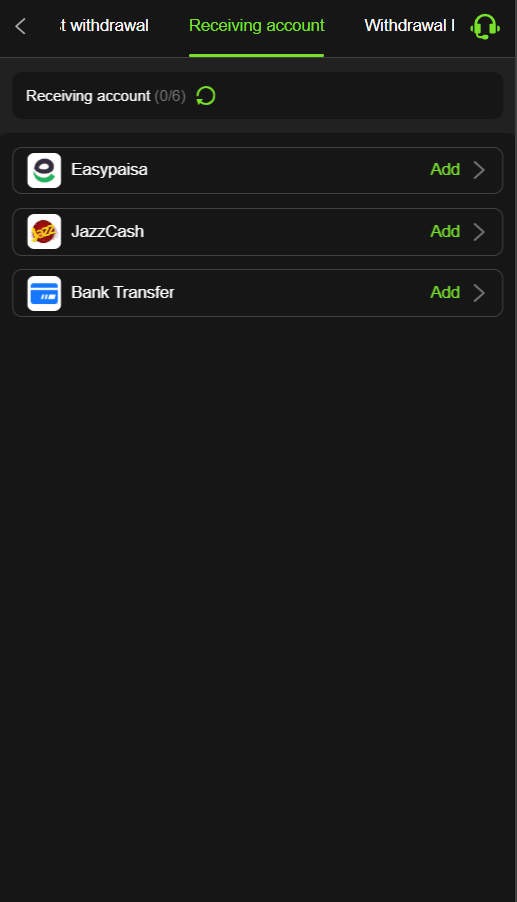
Step 4: Enter Your Correct Account Details
This is one of the most important parts of the withdrawal process.
Enter your wallet number or bank information carefully.
Check every digit before submitting the request.
If the platform requires the payment account to belong to the same person as the X555 account, follow that requirement. Some X555 terms pages specifically state that payment accounts should match the user’s account details.
Step 5: Enter the Withdrawal Amount
Enter the amount you want to withdraw.
Make sure it meets the current minimum withdrawal amount displayed by X555.
Do not rely on a fixed number from an old article because published X555 pages currently show different withdrawal minimums.
Step 6: Review Everything Before Submitting
Before pressing the final button, check:
- Withdrawal amount
- Payment method
- Wallet or bank number
- Account name
- Any displayed fee
- Any verification requirement
- Current withdrawal rules
After checking everything, submit the request.
How Long Does an X555 Withdrawal Take?
There is no single processing time that can safely be applied to every X555 account.
Different current X555 pages publish different timeframes. Some describe wallet withdrawals as taking minutes, while other pages give longer windows or mention additional review for certain transactions.
Therefore, it is better to look at the processing information displayed when you submit your withdrawal.
A delay does not automatically mean that money has been lost. Payment providers can experience network problems, and some transactions may require additional account checks.
Why Can an X555 Withdrawal Become Pending?
A withdrawal can remain pending for several possible reasons.
The payment details may need verification. The account may require additional information. A payment provider may also be experiencing a delay.
There can also be a difference between the time a withdrawal is submitted and the time it reaches the receiving wallet.
If your withdrawal remains pending beyond the timeframe shown by X555, contact support and provide the transaction reference.
Avoid submitting repeated withdrawal requests for the same amount unless the platform specifically tells you to do so.
What If You Enter the Wrong Wallet Number?
This is one of the easiest mistakes to avoid.
Always check your payment number before submitting a withdrawal.
If you discover an error immediately after submitting the request, contact X555 support as soon as possible and provide the transaction details.
Do not try to solve the problem by sending another payment to “balance it out.”
The sooner an incorrect transaction is reported, the more useful the transaction information will be for support.
How to Keep Your X555 Transactions Safer?
Good payment habits are just as important as knowing where the Deposit and Withdraw buttons are.
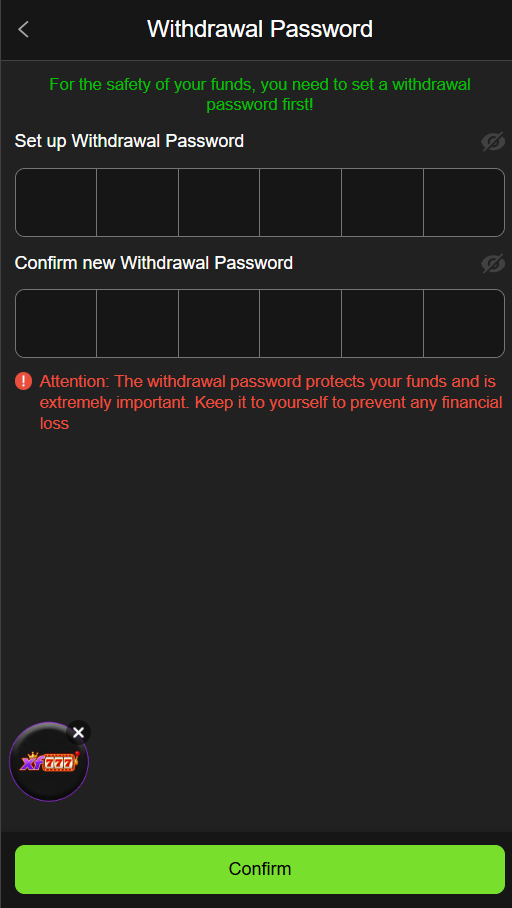
Never give another person your:
- X555 password
- Mobile wallet PIN
- OTP
- Banking password
- Verification code
A genuine payment process should not require you to hand your private PIN or OTP to another person.
Also avoid sending money to a personal number supplied through an unofficial message unless that payment information is clearly verified through your current account.
Do X555 Deposits and Withdrawals Have Fees?
Do not assume that every transaction is free.
Some X555 pages claim there are no platform fees, while third-party payment providers can have their own charges or rules.
Before confirming a transaction, look for any fee displayed on the payment screen.
The amount shown before confirmation is the information you should use for that particular transaction.
A Simple Example for New X555 Users
Suppose you want to add money to your account.
You open X555, enter the wallet section, select an available payment method, enter your amount, review the payment details, and complete the transaction.
After that, you check your X555 balance.
When you later want to withdraw an eligible balance, you open the withdrawal section, choose the available payment method, enter your correct account details, select the amount, review the information, and submit the request.
The process is simple, but checking the details before confirming is the part that matters most.
Deposit vs Withdrawal: What Is the Difference?
The difference is easy to understand.
Deposit: You send money into your X555 account to increase your available gaming balance.
Withdrawal: You request an eligible balance from your X555 account to be sent to your selected payment account.
The two processes may use similar payment methods, but they are not the same transaction.
A deposit does not mean that the money can automatically be withdrawn again. If the account includes bonuses or promotional credits, additional conditions may apply.
Responsible Money Management Matters
X555 and similar gaming platforms should not be treated as guaranteed income sources.
If you choose to play games involving real money, only use an amount you can afford to lose. Do not borrow money to play, and do not increase your spending simply because you lost a previous round.
A win does not guarantee another win, and a previous loss does not mean that the next game will produce a profit.
Keeping a personal spending limit can help you stay in control.
Final Thoughts on X555 Deposits and Withdrawals
Depositing and withdrawing money from X555 is mainly a matter of using the correct account section, selecting an available payment method, entering accurate details, and checking the transaction before confirmation.
For Pakistani users, current X555-related pages commonly mention JazzCash, Easypaisa, and bank transfers, but the published limits and processing times are inconsistent across different X555 websites.
That is why this guide does not present one fixed minimum, maximum, or processing time as a universal X555 rule. Instead, always use the information shown inside your current account at the time of the transaction. Most importantly, keep your payment details private, save transaction references, verify wallet numbers before submitting requests, and never treat gaming as guaranteed earnings.
FAQs
Can I deposit money through JazzCash on X555?
JazzCash is listed as a payment option on several current X555-related pages. However, available methods can differ, so check whether JazzCash appears in your current Deposit section.
Is Easypaisa available for X555 withdrawals?
Several X555 pages mention Easypaisa for withdrawals. Check your own Withdrawal section because payment availability can change between versions or accounts.
Why is my X555 deposit missing?
First, check your payment provider’s transaction history and confirm that the payment was completed. Then check your X555 balance and transaction history. If the money remains missing, contact support with the transaction reference.
Why is my withdrawal pending?
A withdrawal can be delayed by account checks, payment-provider issues, or other processing requirements. Check the status shown in your account and contact support if it exceeds the stated processing period.
Can I withdraw to another person’s wallet?
Do not assume this is allowed. Some published X555 terms require payment accounts to match the user’s account details. Check the current rules before submitting a withdrawal.
Should I keep my payment receipt?
Yes. Keep your transaction reference or receipt until the deposit or withdrawal has been fully completed. It can be useful if you need to contact support.
Are X555 winnings guaranteed?
No. Gaming outcomes are uncertain, and there is no reliable way to guarantee a profit. Users should only risk money they can afford to lose.